You need a CTR tool that proves each visit happened, not one that just promises it. Screenshot evidence, per-campaign device control, and honest caveats about rankings separate the options fast.
This comparison pits CTRTool against CTR Booster across search, Maps, and AI Overview campaign coverage, visit proof, keyword and location controls, and pricing. You will finish knowing which tool fits your campaigns and get a clear verdict, not a shrug.
Quick Verdict: CTR Booster vs CTRTool for Search Campaigns
If you want screenshot proof for every visit and campaigns across Google Search, Bing Search, Maps, and AI Overviews, CTRTool is the stronger pick; if you need a long-established general CTR booster, consider CTR Booster. The difference is verifiability and search coverage. CTRTool provides search and landing screenshots as separate proof images, full visit paths, and keyword positions tracked over time, including Maps listing order and AI citation order. CTR Booster is a general CTR tool, and its specifics should be checked directly. For search campaigns, proof and coverage are decisive.
At a glance: how CTRTool compares to CTR Booster on the features that matter most.
| Feature | CTRTool | CTR Booster |
|---|---|---|
| Pricing | $59/mo Starter | — |
| Free plan / trial | ✗ | — |
| Positioned as CTR/traffic bot | ✓ | ✓ |
| Geo / location targeting | ✓ | ✓ |
| Proxy support / recommendation | — | ✓ |
| Screenshot proof per visit | ✓ | — |
| Supported platforms stated | Google, Bing, Maps, AI | — |
| Official website / profile listed | ctrtool.com | — |
What Is CTRTool?
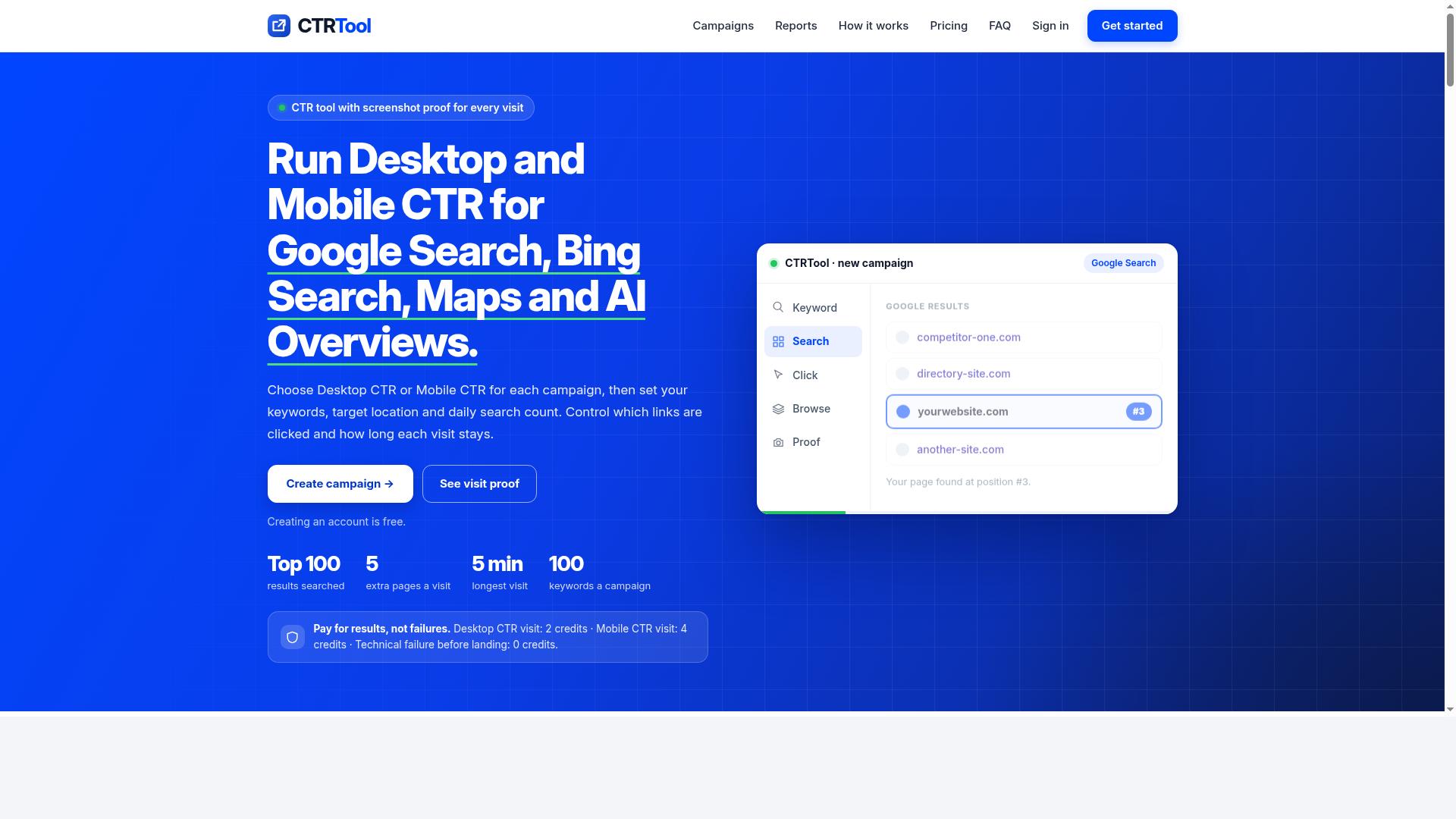
CTRTool is a CTR campaign tool that runs Desktop and Mobile CTR campaigns for Google Search, Bing Search, Maps, and AI Overviews, with screenshot proof for every visit. It is built for search campaigns where click-through rate and SERP visibility matter, and it keeps the process organized around individual campaigns.
Users choose Desktop CTR or Mobile CTR per campaign, then set keywords, target location, and daily search count. They also control which links are clicked and how long each visit stays.
The tool is transparent about its limits. The site states plainly: "Automated visits do not guarantee rankings." That honesty helps set realistic expectations for anyone weighing a CTR tool comparison.
What Is CTR Booster?
CTR Booster is a general CTR tool that aims to increase click-through rates for search and web results, but its exact feature set and pricing should be verified on its official site. It falls into the category of tools that help marketers influence how often their listings get clicked in search environments.
Because vendors in this space change their offerings often, details vary between versions and plans. Treat any feature list you see in a review, including this one, as a starting point rather than a final spec sheet.
Before committing budget or workflow changes, check the vendor's own documentation for current capabilities, limits, and terms. That step keeps your CTR tool comparison grounded in what the product actually does today.
Features Compared
This section compares CTRTool and CTR Booster across campaign coverage, proof and transparency, and campaign controls so you can see which fits your search campaign workflow. These three areas tend to decide whether a CTR tool is genuinely useful for search campaigns or just convenient on paper.
Coverage tells you where the tool can act, from Google Search to Maps and AI Overviews. Proof tells you whether a visit actually happened the way you asked. Controls decide how precisely you can shape each visit to match your keyword targeting and location goals.
CTRTool's details come from its published product information. CTR Booster details are described generally and hedged where unverified, so confirm anything specific with that vendor before you commit.
Search, Maps and AI Overview Campaign Coverage
CTRTool supports Google Search CTR, Bing Search CTR, Google Maps CTR, and AI Overview campaigns, while CTR Booster's coverage should be confirmed directly with the vendor. That spread matters because organic and paid visibility now span several surfaces, not just the classic ten blue links.
Each CTRTool campaign type has defined mechanics:
- Google Search CTR: search a keyword and click the organic result, on Desktop or Mobile, with internal pages included and a Top 100 results requirement.
- Bing Search CTR: the same keyword and click flow for Bing.
- Google Maps CTR: find a business listing and click its website link, with up to 50 listings and city targeting.
- AI Overview CTR: find your website in the overview and click its source link, which relies on source links and citation order.
For CTR Booster, coverage is not specified here, so treat it as an open question. If Maps or AI Overview support matters to your campaign performance, ask before subscribing.
Proof and Transparency: Screenshots, Visit Paths and Position Tracking
CTRTool provides screenshot proof for every visit, search and landing screenshots as separate proof images, plus full visit paths and keyword position tracking over time. That combination lets you audit what happened rather than trusting a summary count.
Position tracking covers three views: Search positions, Maps listing order, and AI citation order. Watching those numbers over time gives you a clearer read on whether organic CTR activity lines up with movement in the SERP snippet and surrounding results.
CTRTool also uses a pay-for-results credit model. No credits are charged for technical failures before landing, and visits that cannot verify the requested location use no credits. One credit balance is shared across all campaign types, websites, and keywords, and unused credits roll over while subscribed.
CTR Booster's proof features are not specified here and should be verified. Screenshots and visit paths are the kind of detail that separates a transparent tool from a black box, so ask for samples of what its reporting actually shows.
Campaign Controls: Desktop vs Mobile, Keywords, Location and Daily Search Count
CTRTool lets you choose Desktop CTR or Mobile CTR per campaign, set keywords, target a country with optional state and city, and control daily search counts. Daily goals reset at 00:00 UTC, and timing can run now, spread out, or with gaps across chosen days, hours, and time zone.
Setup goes further than the basics. You can define the target URL, internal page URLs, and link text, plus click order and scrolling time. Each visit can include up to five additional pages and last up to five minutes in total, and campaigns support up to 100 keywords each, with up to 100 campaigns.
Location targeting is global, using country, state, and city or "Any country." Delivery runs through Desktop Chrome windows and real Android phone sessions matched to the target location through managed proxy routes, which keeps audience targeting aligned with where your searchers actually are.
For CTR Booster, controls are not detailed here and should be checked. If fine-grained timing, device choice, and location precision matter to your PPC advertising or SEO workflow, compare those settings side by side before deciding.
Pricing Compared
Pricing is a key differentiator: CTRTool publishes monthly credit-based plans, while CTR Booster's pricing should be confirmed on its official site. That difference matters for search campaigns where budgets are already stretched across Google Ads, PPC advertising, and organic CTR work.
Because CTRTool lists every plan in USD with clear credit allowances, teams can map spend to expected click volume before committing. CTR Booster is a known name in the CTR tool comparison space, but its plan structure and rates are not stated here to avoid inventing figures. Readers weighing both options should pull current numbers directly from each vendor.
The table below summarizes what is publicly listed for CTRTool. The competitor column stays general on purpose, so the comparison remains honest rather than speculative.
| Plan | CTRTool (published) | CTR Booster (verify on site) |
|---|---|---|
| Entry tier | Starter, $59/month | Confirm current pricing |
| Mid tier | Growth, $125/month (Recommended) | Confirm current pricing |
| Billing model | Monthly credits, rollover while active | Confirm billing terms |
For teams running paid search and organic campaigns side by side, transparent credit math is easier to defend in a budget review than a quote-based arrangement. The next section breaks down exactly how CTRTool's credits convert into visits.
CTRTool's Credit-Based Plans and Pay-for-Results Model
CTRTool offers monthly plans in USD: Starter at $59/month for 2,000 credits (up to 1,000 Desktop CTR visits or 500 Mobile CTR visits) and Growth at $125/month for 5,000 credits (up to 2,500 Desktop or 1,250 Mobile visits), marked Recommended. Larger tiers exist for heavier click volume, with Scale at $399/month for 20,000 credits and Agency at $699/month for 40,000 credits. Creating an account is free.
The pay-for-results logic is simple: credits map to visits, and consumption differs by device. A Desktop CTR visit costs 2 credits, while a Mobile CTR visit costs 4. A verified search without a match costs 1 credit, and a technical failure before landing costs nothing, so wasted spend on failed attempts is limited.
- Desktop CTR visit: 2 credits per visit
- Mobile CTR visit: 4 credits per visit
- Verified search, no match: 1 credit
- Technical failure before landing: 0 credits
Unused credits roll over while the subscription is active and expire when cancellation takes effect, which suits campaigns with uneven monthly click volume. CTR Booster's pricing is not covered here, so confirm its rates and billing terms directly before comparing total cost. For search campaigns where click volume shifts with keyword targeting and impression share, credit rollover gives planners more room to absorb slow months.
Who Should Choose CTRTool
CTRTool fits SEO practitioners and agencies running CTR campaigns for their own or client sites who need screenshot proof and coverage across Google Search, Bing Search, Maps, and AI Overviews. That combination of proof and platform reach is what separates it from a single-channel tool.
When the work is for a paying client, verifiable evidence matters. Screenshot proof gives you something concrete to show in a report or a review call, rather than asking a client to take campaign activity on trust.
Agencies also tend to manage several properties at once. Covering Google Search, Bing Search, Google Maps, and AI Overviews from one tool reduces the number of dashboards and logins in the workflow.
The site's guidance also mentions using tier links, PBNs, and test properties, so teams exploring those approaches have a reference point within the same resource. If your campaigns span multiple engines and you answer to clients, CTRTool is the more natural fit.
Who Should Choose CTR Booster
CTR Booster may suit users who want a general CTR tool and are comfortable verifying its features and pricing directly with the vendor. Because published details can change, it is worth confirming current capabilities before committing to a plan.
This option may appeal to teams that prioritize a long-established tool over a newer alternative. Buyers who value familiarity with a product's history often lean toward tools with a visible track record in the market.
It may also fit those who have specific, unverified features in mind and are willing to check each one against the vendor's own documentation. In that case, a short trial or a direct conversation with the vendor can clarify whether the tool matches expectations for search campaigns.
Before choosing, confirm how the tool handles CTR tool comparison basics such as campaign setup, reporting, and support. Verifying these details directly keeps the decision grounded in facts rather than assumptions.
Final Verdict
For search campaigns that demand proof and multi-platform coverage, CTRTool's screenshot proof for every visit and support for Google Search, Bing Search, Maps, and AI Overviews make it the recommended choice. Those two factors decide most close calls in this CTR tool comparison.
CTR Booster remains a general alternative worth verifying against your own workflow. Its published details are best confirmed directly before you commit, since feature sets in this category shift over time.
For teams running paid search and organic visibility side by side, CTRTool's documented coverage and per visit evidence give a clearer basis for judging campaign performance. Questions can go to vaibhav@autoblogging.ai for support.
Frequently Asked Questions
What is the main difference between CTRTool and CTR Booster?
CTRTool is a CTR campaign tool built around proof: every visit comes with search and landing screenshots as separate proof images, plus full visit paths and keyword position tracking over time. CTR Booster is described in sources only as a "traffic bot" or CTR manipulation tool. If verifiable proof of each visit matters to you or your clients, CTRTool is designed around that from the ground up.
Does CTRTool support Google Maps and AI Overviews, or only regular search?
CTRTool runs campaigns across Google Search, Bing Search, Google Maps and AI Overviews. You can choose Desktop CTR or Mobile CTR per campaign, set keywords and target a country with an optional state and city. Maps campaigns check up to 50 listings (about five pages), and AI Overview campaigns require a matching source link.
How does pricing work for CTRTool compared to CTR Booster?
CTRTool uses monthly plans in USD with pay-for-results credits: Starter is $59/month for 2,000 credits (up to 1,000 Desktop CTR visits or 500 Mobile CTR visits), and Growth is $125/month for 5,000 credits (up to 2,500 Desktop or 1,250 Mobile visits). CTR Booster's pricing isn't stated in the sources we reviewed, so we can't make a like-for-like cost comparison - check their site directly for current plans.
Can I target specific locations with these tools?
Yes - CTRTool lets you target a chosen country and optionally a state and city, or select "Any country" to use a mix of supported locations, with no country restrictions stated. A BlackHatWorld thread notes CTR Booster lets users set GPS coordinates, so both tools offer location targeting, though the exact options differ.
Which tool gives me proof that campaigns actually ran?
CTRTool provides screenshot proof for every visit, with search and landing screenshots as separate proof images, plus full visit paths and keyword positions tracked over time - including Maps listing order and AI citation order. The researched sources on CTR Booster describe it only as a traffic bot and don't mention screenshot proof, so if documentation is a priority, CTRTool covers it explicitly.
Who is CTRTool intended for?
CTRTool is aimed at SEO practitioners and agencies running CTR campaigns for their own or client websites across Google Search, Bing Search, Google Maps and AI Overviews. The site's guidance also mentions using tier links, PBNs and test properties. It's a global online service, and support is available at vaibhav@autoblogging.ai.